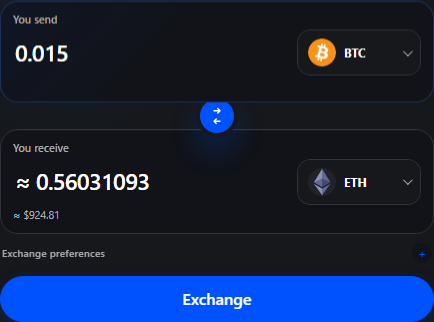
 Amount stepEnter one amount and choose the pair.
Clear answers before money moves.
Understand wallets, quote changes, route limits, tracking, and common error states before starting a swap.
Amount stepEnter one amount and choose the pair.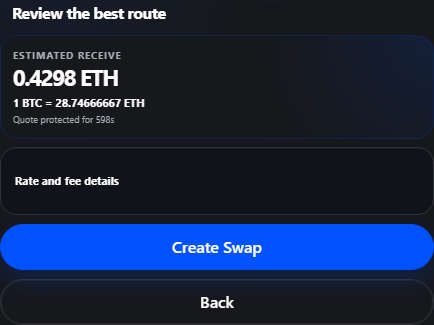 Quote stepReview receive amount, rate, and fees.
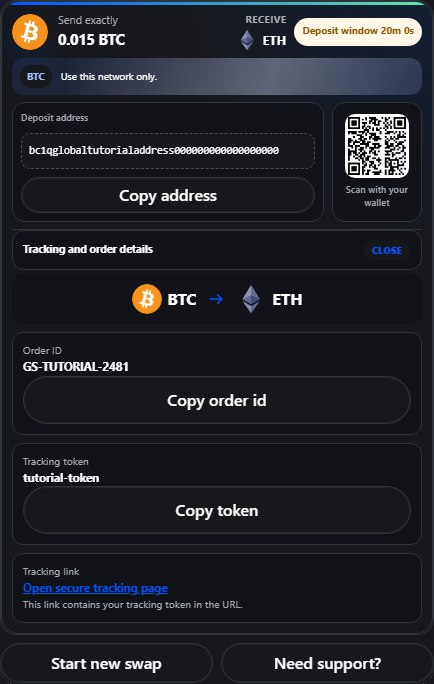 Deposit stepCopy the address, scan QR, and track status.
Error examples
What a warning can mean.
Most swap errors are protection checks. They stop users before a wrong asset, wrong network, or unsupported amount creates a bigger problem.
Destination wallet format looks invalid
The wallet does not match the selected receive network. Check ETH vs BTC vs XRP, then paste again.
No route available for this amount
The provider rejected the amount or pair. Try a slightly higher/lower amount or a different network.
Use this network only
Only send the asset and network shown on Step 4. Wrong-network deposits can need manual recovery.
What is the recipient address?
It is the wallet where the received asset will be sent. Match the asset and network before creating the order.
What is a transaction hash?
A transaction hash is the public blockchain id for your transfer. Support can use it to verify deposits.
Floating vs fixed rate?
Floating follows the market until execution. Fixed locks a quote for a short time window when available.
How long does a swap take?
Most swaps complete in minutes, but timing depends on network confirmations, liquidity, and risk checks.
Why is there a minimum amount?
Providers set pair-specific minimums so network and route fees do not consume the swap.
What if I sent to the wrong network?
Do not send more funds. Save the transaction hash and open a ticket immediately. Recovery depends on the provider and chain.
Why does the tracking link contain a token?
The token lets the tracking page show private order details without making the order public to anyone with only the ID.
When should I contact support?
Contact support when an order is stuck, the deposit was sent to the wrong network, or the tracking page does not update.